
WN-7T94XR
10Gbps WAN/LAN, WiFi7 トライバンドに対応したルーターです。
こいつの中身がOpenwrt + QSDKらしいという噂はかなり前から流れていましたが、実際にBusyBox/SSHでOpenwrt層までアクセスした人はなかなかいませんでした。
分解してUARTに繋いでいた人はいたような気がしますが、そこそこお高い上に私のモバイル環境のメインルーターだったので分解せずにSSHを取得したかったため今回色々と探していました。
今回やること
- 純正バックアップを取得
- バックアップ復元経由でいじった設定を
/overlayへ配置 - 一時的にroot shellを取得
- DropbearでSSHを解放
- お試しでRAMにLuCIを展開
前提
今回試したのは、WN-7T94XR ファームウェアバージョン v2.3.1です。
これ以外のファームウェアではテストしていないので悪しからず。
今後のアップデートで塞がれる可能性もないではないです。
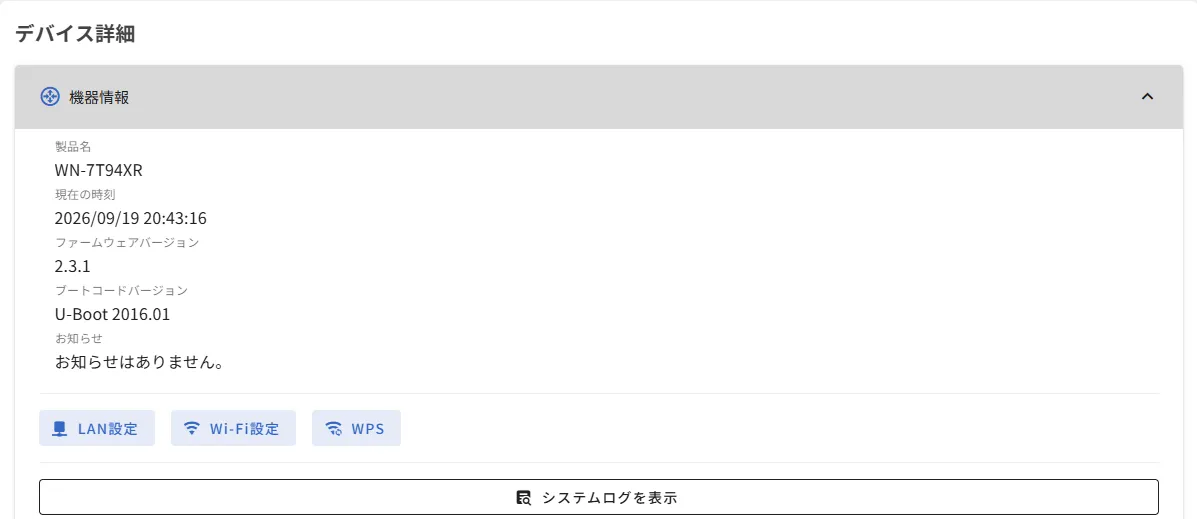
一時Shell取得まで
純正WebUIからAPI経路を探す
はじめに、純正UIからAPIアクセス出来そうな経路が無いか探します。
DevToolsを開いて、ファームウェア更新・設定バックアップなどルーターとの通信が発生する操作を行います。
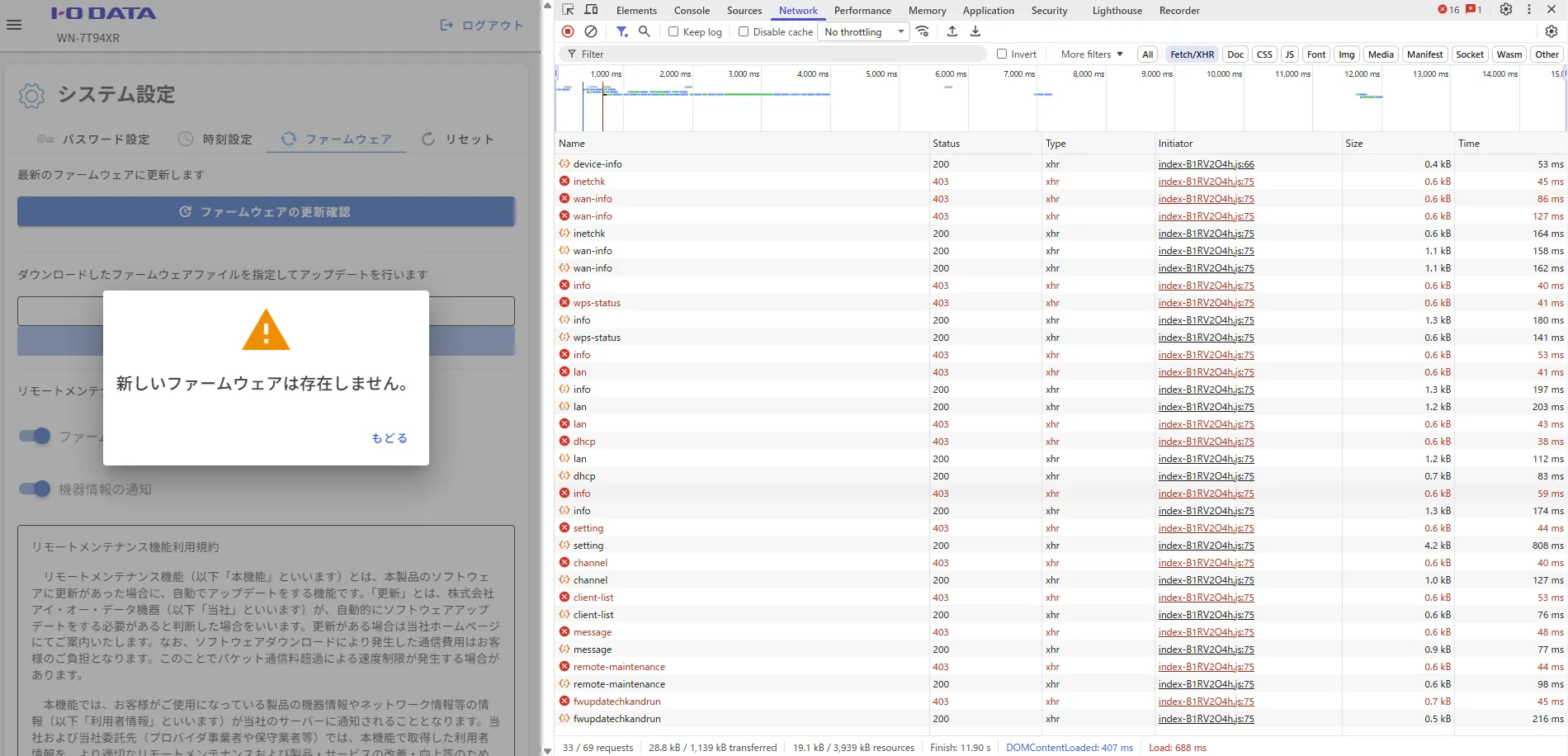
今回はファームウェア更新操作を使用しました。
さっそく/api/v1/fwupdatecheckandrunが見えますね。
しばらく探していると、
POST /api/v1/system/config/backup
POST /api/v1/system/config/restore
POST /api/v1/system/firmware
POST /api/v1/fwupdatechkandrun
のようなエンドポイントを確認できました。
403 -> 200
気になったのは、403で弾かれた直後に200でリクエストが通っていることです。
レスポンスヘッダを覗いて確認したところ、403でDigest Challengeを発行し、2回目で認証付きのリトライを行っているようです。
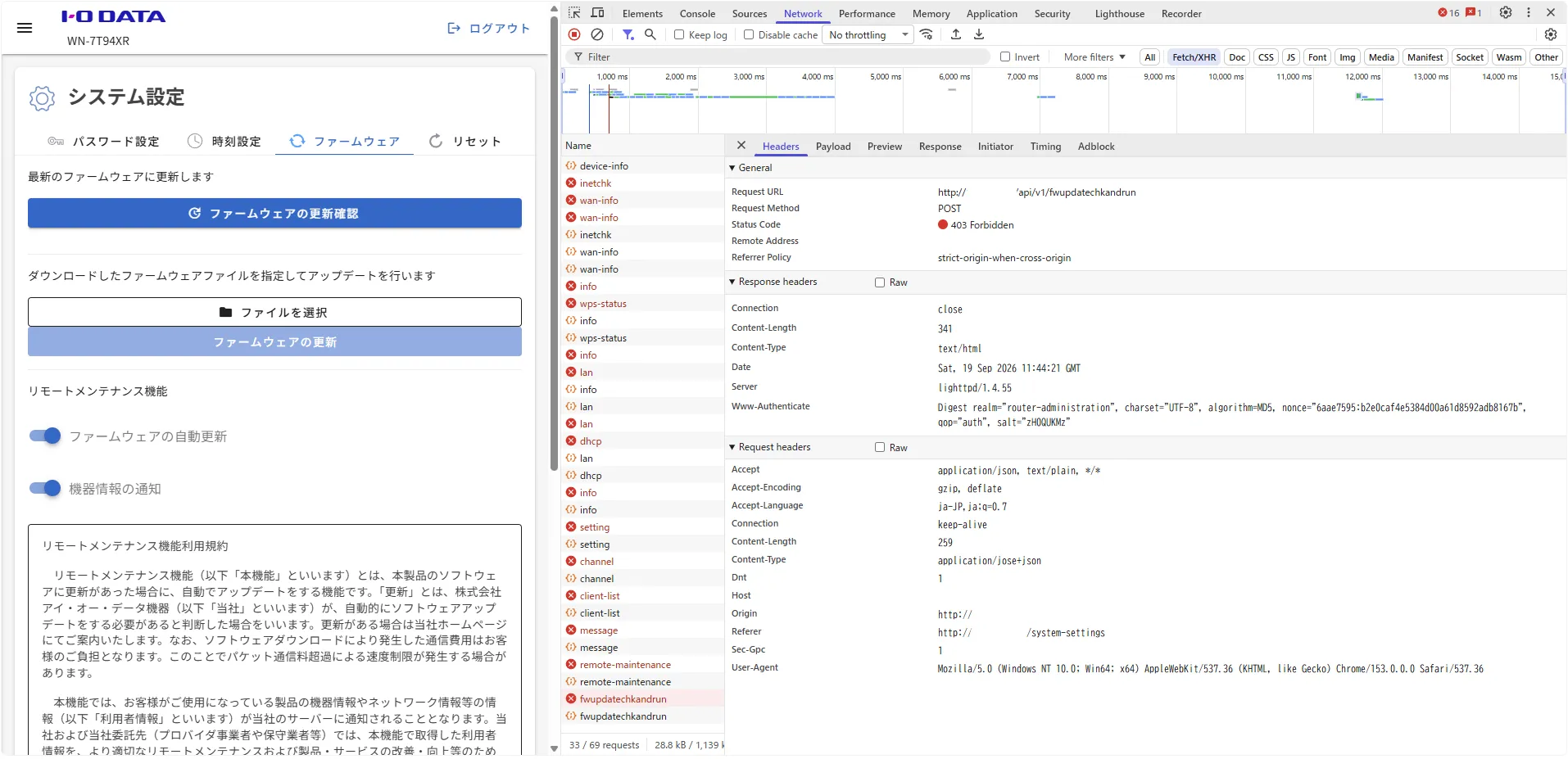
ここは単純なAPI失敗ではなく、
1回目 -> Digest Challenge
2回目 -> 認証情報付きでRetry
という流れになっていました。
JWE化されているAPIを見分けよう
fwupdatechkandrunなどのRequest Headersを見ると、
Content-Type: application/jose+jsonとなっていました。
Request Payloadも通常JSONではなくJWEでした。
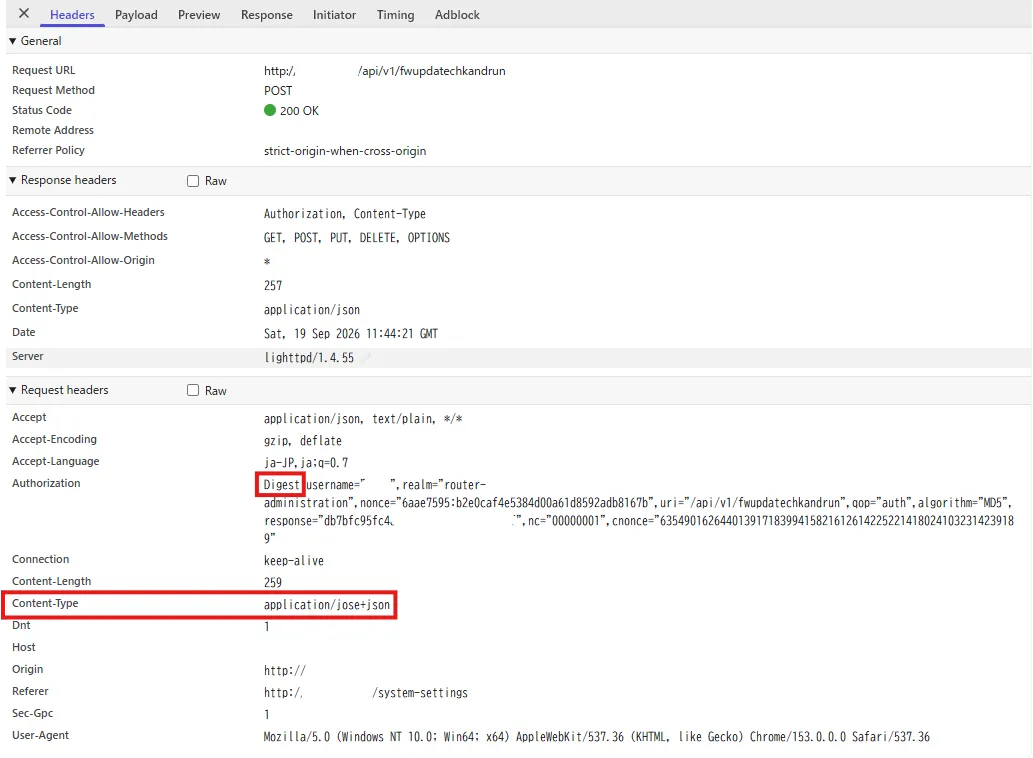
どうやらフロントエンドで暗号化/復号化処理をしているようなので、次はJavaScript側を追いかけます。
フロントエンドの暗号化処理を探す
DevToolsのSourcesを開き、読み込まれているJavaScriptを検索します。
minifyされている場合は必要に応じてPretty Printし、
application/jose+json
PBES2-HS512+A256KW
A256GCM
fwupdatechkandrun
あたりを検索していきます。
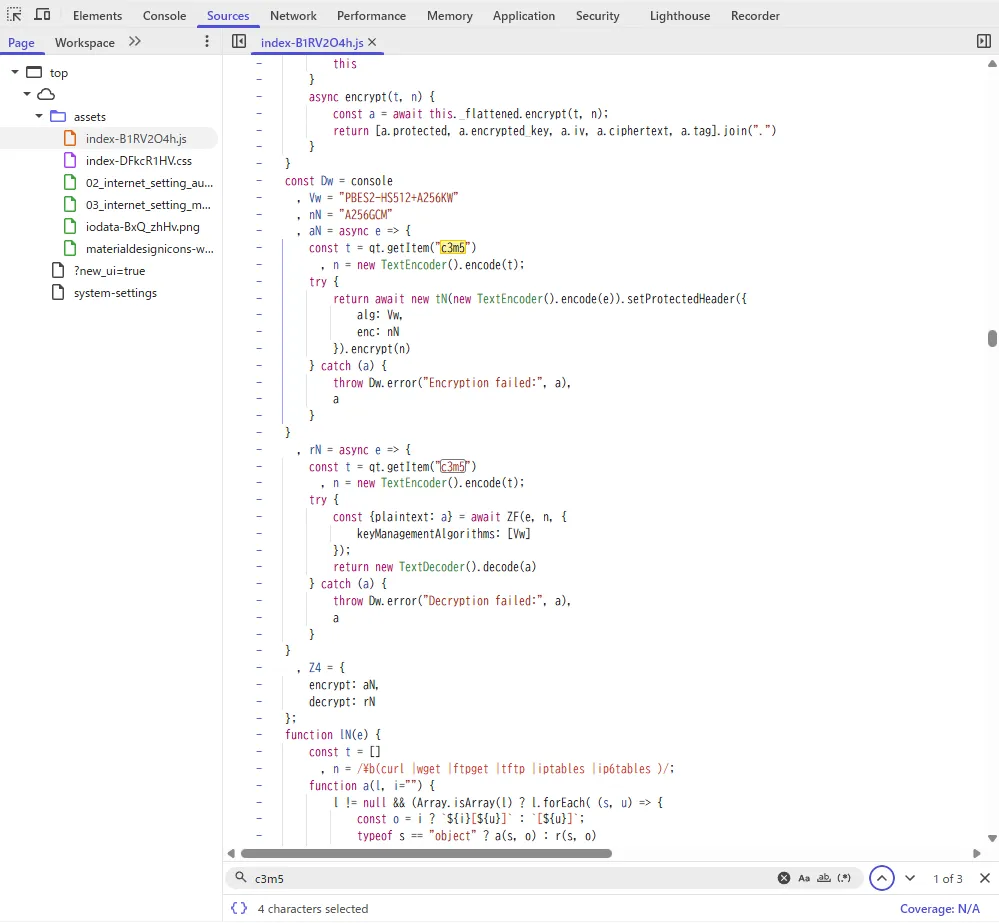
すると、以下のような暗号化・復号化処理が見つかりました。
const Vw = "PBES2-HS512+A256KW",
      nN = "A256GCM";

aN = async e => {
    const t = qt.getItem("c3m5"),
          n = new TextEncoder().encode(t);

    return await new tN(
        new TextEncoder().encode(e)
    )
        .setProtectedHeader({
            alg: Vw,
            enc: nN
        })
        .encrypt(n)
};

rN = async e => {
    const t = qt.getItem("c3m5"),
          n = new TextEncoder().encode(t);

    const { plaintext: a } =
        await ZF(e, n, {
            keyManagementAlgorithms: [Vw]
        });

    return new TextDecoder().decode(a)
};
これで、
alg = PBES2-HS512+A256KW
enc = A256GCM
を使ったJWEであることが分かります。
また、暗号化・復号化に使用している値は、
qt.getItem("c3m5")から取得しているようです。
c3m5を見てみる
DevToolsのApplicationからSession Storageを確認すると、c3m5というキー自体は存在していました。

Session Storage上の値はSalted__系の形式で暗号化されており、先ほどのコードでは、
qt.getItem("c3m5")という独自ラッパーを通して値を取り出しています。
つまり、
sessionStorage.getItem("c3m5")と、
qt.getItem("c3m5")は別物で、前者は保存されている暗号化済みの値、後者はアプリケーション側で復号された後の値になります。
この時点で、Storageの値をそのままコピーして使ってもダメそうだと判断。
DevToolsで実際に使われている鍵を確認する
Breakpointで中身を見ます。
先ほど見つけた暗号化処理の
const t = qt.getItem("c3m5")の直後あたりにBreakpointを置きます。
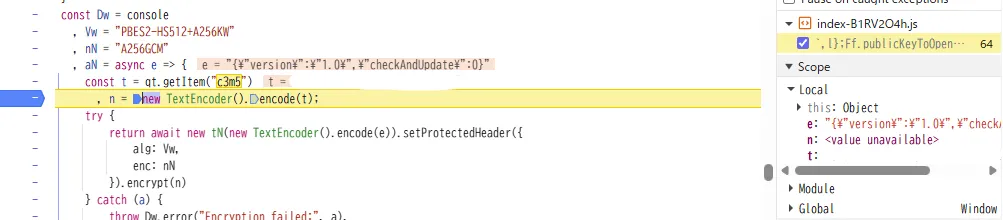
その状態で再び純正UIからファームウェア更新確認など、JWEを使用する操作を実行します。
停止したら右側のScopeから変数tを確認します。
または停止中のConsoleで、
tでも見れます。

ここで取得できた値が実際にJWE暗号化・復号化に使用されている値です。
値が合っているか検証
鍵らしき値は取れたので、復号化側の処理にもBreakpointを置いて実際に復号されたPayloadを確認します。
fwupdatechkandrunを実行すると
{
  "version": "1.0",
  "checkAndUpdate": 0
}
のようなJSONが取得できました。
純正UIで行った操作と内容も一致していますね。
PBES2-HS512+A256KW
+
A256GCM
+
qt.getItem("c3m5")で取得した値
バックアップAPIは暗号化されてなくね?
ここまでJWEを追っていましたが、JavaScript側のAPI設定をさらに見ていくと、
const ko = {
    target: {
        hostname: "self",
        port: 80,
        api_version_path: "/api/v1"
    },

    auth: {
        digest: {
            enabled: true,
            statusCode: 403,
            excludePaths: [
                "/api/v1/router/device-info"
            ]
        }
    },

    enc: {
        enabled: true,
        excludePaths: [
            "/api/v1/router/device-info",
            "/api/v1/system/firmware",
            "/api/v1/system/config/restore",
            "/api/v1/system/config/backup"
        ]
    }
};
のような設定がありました。
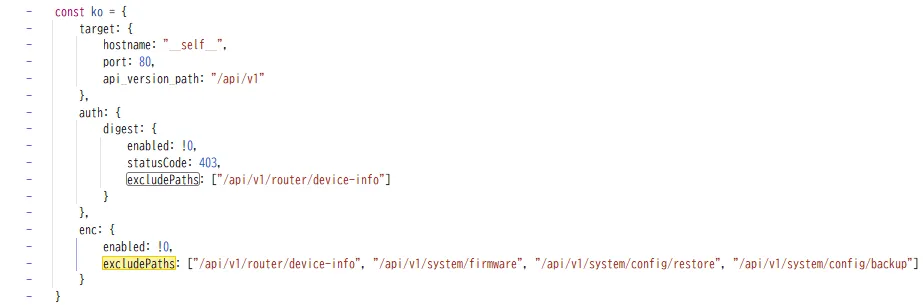
つまり、
/api/v1/system/config/backup
/api/v1/system/config/restore
はJWE暗号化の対象外でした。
完全に無駄な操作だったroot shellを取るだけならもっと単純な経路が使えそうなので、次は純正の設定バックアップを取得して中身を見ます。
純正バックアップの中身を調べる
純正WebUIから設定バックアップを取得します。
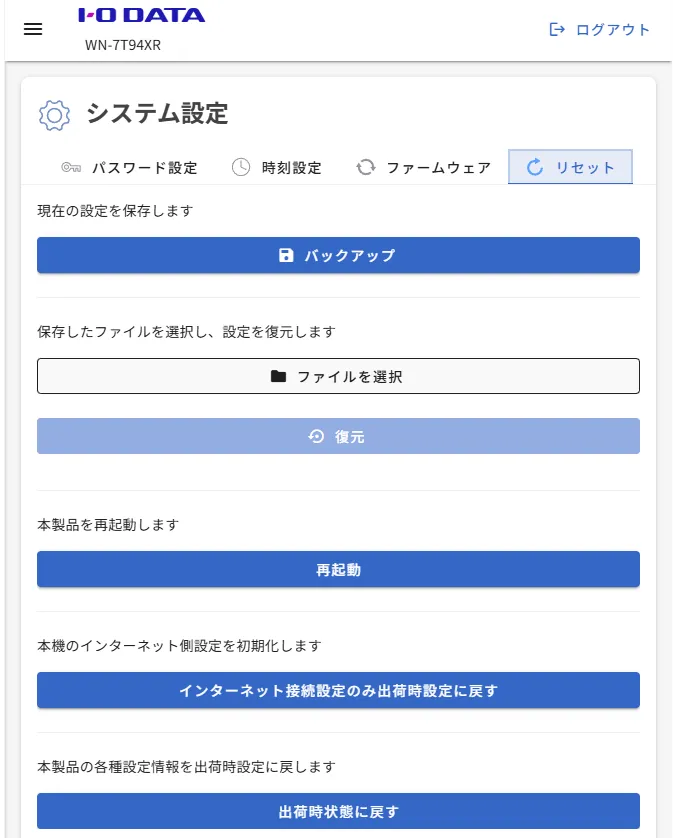
ダウンロードしたファイルをそのままfileやtarに食わせても、普通のtar.gzとしては認識されないので末尾を調べてみると、
[gzipで圧縮されたtar]
[32文字のASCII MD5]
[4文字のtrailer]
って感じでした。
gzip(tar(files)) + md5(gzip_data) + trailerですかね?
この形式が分かれば
- gzip部分を取り出して
- tarを展開して
- 中身をいじくりまわして
- 固めて
- 新しいgzip部分のMD5を末尾へくっつけて
- 元と同じtrailerを付ける
で、純正UIから読み込める設定バックアップを作れそう。
バックアップを実際に展開してみる
実際に展開します。
まずは「何がバックアップ対象になっているのか」を見ます。
手で切り貼りするのも面倒なので、解析・展開・再生成をまとめて出来るスクリプトを作りました。
適当にwn7_backup.pyとして保存
#!/usr/bin/env python3
import argparse
import hashlib
import io
import pathlib
import tarfile

TRAILER_LEN = 4
MD5_LEN = 32
TAIL_LEN = MD5_LEN + TRAILER_LEN

def md5_hex(data: bytes) -> str:
    return hashlib.md5(data).hexdigest()

def inspect_backup(src: pathlib.Path):
    raw = src.read_bytes()
    if len(raw) <= TAIL_LEN:
        raise RuntimeError("backup file is too small")

    gzip_part = raw[:-TAIL_LEN]
    stored_md5 = raw[-TAIL_LEN:-TRAILER_LEN].decode("ascii")
    trailer = raw[-TRAILER_LEN:].decode("ascii", errors="replace")
    calc_md5 = md5_hex(gzip_part)

    print(f"file        : {src}")
    print(f"size        : {len(raw)} bytes")
    print(f"gzip size   : {len(gzip_part)} bytes")
    print(f"stored md5  : {stored_md5}")
    print(f"calc md5    : {calc_md5}")
    print(f"md5 match   : {stored_md5.lower() == calc_md5.lower()}")
    print(f"trailer     : {trailer!r}")

    return gzip_part, stored_md5, trailer

def extract_backup(src: pathlib.Path, outdir: pathlib.Path):
    gzip_part, stored_md5, trailer = inspect_backup(src)
    outdir.mkdir(parents=True, exist_ok=True)

    with tarfile.open(fileobj=io.BytesIO(gzip_part), mode="r:gz") as tf:
        tf.extractall(outdir)

    print(f"extracted   : {outdir}")

def build_backup(rootdir: pathlib.Path, original: pathlib.Path, output: pathlib.Path):
    _, _, trailer = inspect_backup(original)

    buf = io.BytesIO()
    with tarfile.open(fileobj=buf, mode="w:gz") as tf:
        for entry in sorted(rootdir.iterdir(), key=lambda p: p.name):
            tf.add(entry, arcname=entry.name, recursive=True)

    gzip_part = buf.getvalue()
    digest = md5_hex(gzip_part).encode("ascii")
    output.write_bytes(gzip_part + digest + trailer.encode("ascii"))

    print(f"built       : {output}")
    print(f"md5         : {digest.decode()}")
    print(f"trailer     : {trailer!r}")
    print(f"total size  : {output.stat().st_size} bytes")

def main():
    ap = argparse.ArgumentParser()
    sub = ap.add_subparsers(dest="cmd", required=True)

    p = sub.add_parser("inspect")
    p.add_argument("backup", type=pathlib.Path)

    p = sub.add_parser("extract")
    p.add_argument("backup", type=pathlib.Path)
    p.add_argument("outdir", type=pathlib.Path)

    p = sub.add_parser("build")
    p.add_argument("rootdir", type=pathlib.Path)
    p.add_argument("original", type=pathlib.Path)
    p.add_argument("output", type=pathlib.Path)

    args = ap.parse_args()

    if args.cmd == "inspect":
        inspect_backup(args.backup)
    elif args.cmd == "extract":
        extract_backup(args.backup, args.outdir)
    elif args.cmd == "build":
        build_backup(args.rootdir, args.original, args.output)

if __name__ == "__main__":
    main()
まずは元バックアップをそのまま解析します。
python wn7_backup.py inspect WN-7T94XR-config.binstored md5 と calc md5 が一致することを確認したら展開。
python wn7_backup.py extract WN-7T94XR-config.bin config-rootopenwrtであることはほぼ確定なので、展開後はこの辺を見ていきます。
backup-root/etc/config/system
backup-root/etc/config/network
backup-root/etc/config/wireless
backup-root/etc/config/firewall
backup-root/etc/passwd
backup-root/etc/shadow
backup-root/etc/rc.local見た感じ、/etc以下の実ファイルがそのまま入ってます。
ってことはバックアップを書き換えて純正WebUIからリストアすればoverlayに書き戻せるんじゃね?ということでテスト。
telnetserverを1にしてみる
展開したetc/config/systemを眺めていると、
option telnetserver '0'という、いかにも怪しい項目がありました。
ファームウェア側の起動スクリプトを追うと、こんな処理も残っています。
local telnet_mode=`uci get system.@system[0].telnetserver`

if [ "$telnet_mode" == "0" ]; then
    killall telnetd
else
    /usr/sbin/telnetd &
fi
0を1に書き換えて、バックアップを作り直してみます。
書き換えたら、さっきのwn7_backup.pyで純正形式へ戻します。
python wn7_backup.py build config-root WN-7T94XR-config.bin modified-config.bin出来上がったファイルも一応もう一度確認。
python wn7_backup.py inspect modified-config.binmd5 match: Trueになっていれば、少なくともファイル形式としては元と同じです。
純正WebUIの設定復元からこの改変バックアップを読み込ませます。
リストアは成功したっぽく、ルーターも再起動しました。
23/tcpを見てみます。
nc -vz 10.0.10.253 23ダメでした。
- 改変バックアップ自体はrestoreされたがtelnetdが起動出来ていない
- telnetserverの変更が無視された
- restoreされたが起動スクリプト側が別条件で止めている
- そもそもtelnetd本体が無い
あたり。
rc.localを変えてみる
バックアップにetc/rc.localがいるので、むりやりinetdからashを起動するように加工してみましょう。
rc.localを加工する
patch_rc_local.py:
#!/usr/bin/env python3
import argparse
from pathlib import Path

BEGIN = "# ASH2323-BEGIN"

BLOCK = r'''
# ASH2323-BEGIN
cat >/etc/inetd-ash2323.conf <<'EOC'
2323 stream tcp nowait root /bin/ash ash -i
EOC

/usr/sbin/inetd -f /etc/inetd-ash2323.conf &
# ASH2323-END
'''.strip()

def patch(path: Path):
    text = path.read_text(encoding="utf-8", errors="replace")

    if BEGIN in text:
        print("ASH2323 block already exists")
        return

    lines = text.splitlines()

    while lines and not lines[-1].strip():
        lines.pop()

    if lines and lines[-1].strip() == "exit 0":
        lines.pop()

    new_text = "\n".join(lines).rstrip() + "\n\n"
    new_text += BLOCK + "\n\nexit 0\n"

    backup = path.with_suffix(path.suffix + ".before-ash2323")
    backup.write_text(text, encoding="utf-8")
    path.write_text(new_text, encoding="utf-8")

    print(f"patched : {path}")
    print(f"backup  : {backup}")

def main():
    ap = argparse.ArgumentParser()
    ap.add_argument("rc_local", type=Path)
    args = ap.parse_args()
    patch(args.rc_local)

if __name__ == "__main__":
    main()
実行。
python patch_rc_local.py config-root/etc/rc.local最終的にrc.localの末尾が、
# ASH2323-BEGIN
cat >/etc/inetd-ash2323.conf <<'EOC'
2323 stream tcp nowait root /bin/ash ash -i
EOC

/usr/sbin/inetd -f /etc/inetd-ash2323.conf &
# ASH2323-END

exit 0
みたいになってればOK。
もう一度バックアップを作って書き戻す
ここもさっきと同じです
python wn7_backup.py build config-root WN-7T94XR-config.bin WN-7T94XR-config-ash.bin確認。
python wn7_backup.py inspect WN-7T94XR-config-ash.binそして純正WebUIの設定復元からWN-7T94XR-config-ash.binをrestore。
再起動後、今度は2323/tcpを見る。
nc 10.0.10.253 2323接続出来た!idを投げると、uid=0(root) gid=0(root)が返ってきました。
root ash取得完了です。
生TCP shellが使いにくいのでラッパーを作る
rootは取れましたがPTYが無いので死ぬほど扱いづらいです。
最初はPowerShellから生TCPで叩いていましたがやってられないのでラッパーを作りました。
wn7_shell.py:
#!/usr/bin/env python3
import argparse
import select
import socket
import sys
import threading
import time

def receiver(sock, stop_event):
    while not stop_event.is_set():
        try:
            r, _, _ = select.select([sock], [], [], 0.2)
            if not r:
                continue

            data = sock.recv(65536)
            if not data:
                print("\n[connection closed]")
                stop_event.set()
                return

            sys.stdout.buffer.write(data)
            sys.stdout.buffer.flush()

        except OSError as e:
            if not stop_event.is_set():
                print(f"\n[recv error: {e}]")
            stop_event.set()
            return

def interactive(host, port, timeout):
    sock = socket.create_connection((host, port), timeout=timeout)
    sock.settimeout(None)

    print(f"[connected to {host}:{port}]")
    print("[raw ash shell: no PTY; vi/top/job control may not work]")
    print("[type exit or Ctrl+C to quit]\n")

    stop_event = threading.Event()
    t = threading.Thread(target=receiver, args=(sock, stop_event), daemon=True)
    t.start()

    try:
        while not stop_event.is_set():
            try:
                line = input()
            except EOFError:
                break

            if line.strip() == "exit":
                try:
                    sock.sendall(b"exit\n")
                except OSError:
                    pass
                break

            sock.sendall((line + "\n").encode())

    except KeyboardInterrupt:
        print("\n[disconnecting]")

    finally:
        stop_event.set()
        try:
            sock.shutdown(socket.SHUT_RDWR)
        except OSError:
            pass
        sock.close()

def exec_once(host, port, command, timeout):
    sock = socket.create_connection((host, port), timeout=timeout)
    sock.setblocking(False)

    marker = f"__WN7_DONE_{time.time_ns()}__"
    payload = f"{command}\nprintf '\\n{marker}:%s\\n' \"$?\"\n"
    sock.sendall(payload.encode())

    buf = bytearray()
    deadline = time.monotonic() + timeout

    while time.monotonic() < deadline:
        r, _, _ = select.select([sock], [], [], 0.2)

        if not r:
            continue

        try:
            data = sock.recv(65536)
        except BlockingIOError:
            continue

        if not data:
            break

        buf.extend(data)

        text = buf.decode(errors="replace")
        if marker in text:
            before, after = text.split(marker, 1)
            sys.stdout.write(before.rstrip() + "\n")

            try:
                status = int(after.splitlines()[0].lstrip(":"))
            except Exception:
                status = 0

            sock.close()
            return status

    sys.stdout.buffer.write(buf)
    sock.close()
    print("\n[timeout waiting for completion marker]", file=sys.stderr)
    return 124

def main():
    ap = argparse.ArgumentParser(
        description="WN-7T94XR temporary raw ash shell wrapper"
    )

    ap.add_argument("--host", default="10.0.10.253")
    ap.add_argument("--port", type=int, default=2323)
    ap.add_argument("--timeout", type=float, default=10.0)

    sub = ap.add_subparsers(dest="mode")
    sub.add_parser("shell")

    p = sub.add_parser("exec")
    p.add_argument("command")

    args = ap.parse_args()
    mode = args.mode or "shell"

    if mode == "shell":
        interactive(args.host, args.port, args.timeout)
    else:
        raise SystemExit(
            exec_once(args.host, args.port, args.command, args.timeout)
        )

if __name__ == "__main__":
    main()
対話で入る場合。
python wn7_shell.py --host 10.0.10.253 shell単発でコマンドだけ投げることも出来ます。
python wn7_shell.py exec "id"ただしPTYではないのでviとかtopなどは使えないと思って下さい。さっさとSSHを開いてしまいましょう。
さっきのtelnet失敗はなんで?
ls -l /usr/sbin/telnetd
busybox --list | grep -x telnetd
grep -R "telnetserver\|telnetd" /etc/init.d /lib 2>/dev/null/usr/sbin/telnetd自体がいなかった。
ただ起動スクリプト側にはさっきの
local telnet_mode=`uci get system.@system[0].telnetserver`

if [ "$telnet_mode" == "0" ]; then
    killall telnetd
else
    /usr/sbin/telnetd &
fi
自体はいたので単純にtelnetが入ってないだけでした。
せっかくrootが取れたので中身を見る
# uname -a
Linux WN-7T94XR 5.4.213 ... armv7l GNU/Linux
# cat /etc/openwrt_release
DISTRIB_ID='OpenWrt'
DISTRIB_RELEASE='19.07-SNAPSHOT'
DISTRIB_REVISION='r0-1a9844982'
DISTRIB_TARGET='ipq53xx/ipq53xx_32'
DISTRIB_ARCH='arm_cortex-a7_neon-vfpv4'やっぱりOpenwrt + QSDKですね。
SoC自体はIPQ53xx系ですが、純正ユーザーランドは32bit ARMです。
MTDも見てみます。
mtd20 "rootfs_1"
mtd21 "rootfs"
mtd24 "wifi_fw"
mtd25 "kernel"
mtd26 "ubi_rootfs"
mtd27 "rootfs_data"rootfs_1とrootfsがあり、A/B構成になっています。
もう一つ大事だったのがdf -h。
書き込み可能なoverlayが1MB弱しかないです。
なのでここから先はSSHなど最低限のものだけoverlayへ、LuCIなどはメモリに展開します。
SSHを入れる
2323/tcpのshellをいつまでも開けておくのは認証ないし嫌なのでまずSSHを入れます。
opkg feedをarchiveへ向ける
純正の19.07-SNAPSHOT feedは古すぎて使えませんでした。
ただユーザーランドは32bitなので64bitパッケージを持ってくるとまずいです。
実際にopkgが受け付けるarchitectureを確認します。
# opkg print-architecture
arm_cortex-a7_neon-vfpv4
でした。
なのでこのarchitecture向けの19.07 archiveを使います。
念のため元のfeed設定を退避。
cp /etc/opkg/distfeeds.conf \
   /etc/opkg/distfeeds.conf.before-archive
差し替え。
cat >/etc/opkg/distfeeds.conf <<'EOF'
src/gz openwrt_base http://archive.openwrt.org/releases/packages-19.07/arm_cortex-a7_neon-vfpv4/base
src/gz openwrt_luci http://archive.openwrt.org/releases/packages-19.07/arm_cortex-a7_neon-vfpv4/luci
src/gz openwrt_packages http://archive.openwrt.org/releases/packages-19.07/arm_cortex-a7_neon-vfpv4/packages
EOF
更新。
opkg updateopkg upgradeはしません。
容量食い尽くされて死にかねないし勝手に更新されて危ないので。
Dropbearを入れる
opkg install dropbearポートは2222へ。
uci set dropbear.@dropbear[0].PasswordAuth='on'
uci set dropbear.@dropbear[0].RootPasswordAuth='on'
uci set dropbear.@dropbear[0].Port='2222'
uci commit dropbear

/etc/init.d/dropbear enable
/etc/init.d/dropbear restart
パスワードログインを残したままでもいいですが、普段使いは公開鍵にします。
PC側でRSA鍵を作成。
ssh-keygen -t rsa -b 4096 -f wn7_root_rsarouter側。
mkdir -p /root/.ssh
chmod 700 /root/.ssh公開鍵を/root/.ssh/authorized_keysへ入れたあと
chmod 600 /root/.ssh/authorized_keys接続。
ssh -i wn7_root_rsa -p 2222 -o HostKeyAlgorithms=+ssh-rsa -o PubkeyAcceptedAlgorithms=+ssh-rsa [email protected]今回入ったDropbearは2019.78とかなり古く、ED25519で作って弾かれまくってました。
最近のOpenSSHだとssh-rsaがデフォルト無効なので上の2オプションを足しています。
これでようやく普通のPTY付きshellです。
2323/tcpの仮設root shellを消す
SSHが確実に使えるのを確認したら、最初に作った認証なしshellは消します。
killall inetd
rm -f /etc/inetd-ash2323.conf/etc/rc.localから、
# ASH2323-BEGIN
...
# ASH2323-END
も消します。
ここを残すと再起動するたびに2323/tcpが復活するので忘れると普通に危ないです。
お試しでLuCIを動かしてみる
ここまで来るとLuCIも動かしてみたくなります。
LuCI一式を普通に入れるとoverlayが埋まるので全部 /tmp に置くことにしました。
この機種では純正rpcdとOpenWrt archive側のrpcd-mod-luciでライブラリの噛み合わせが違うので、純正rpcdは触らず
純正rpcd       → そのまま
LuCI本体       → /tmp/wn7-root
archive版rpcd  → /tmp/luci-abi
LuCI用uhttpd   → 8080/tcp
にします。
手作業で順番に入れる必要もないので、ここは最初から一発で組むスクリプトにしました。
LuCIをRAMへ展開する
以下を/root/setup_luci_ram.shとして保存します。
cat >/root/setup_luci_ram.sh <<'EOF'
#!/bin/ash
set -e

RAMROOT=/tmp/wn7-root
ABIRoot=/tmp/luci-abi
STACK=/tmp/luci-stack

stop_pidfile()
{
    [ -s "$1" ] || return 0

    pid="$(cat "$1" 2>/dev/null || true)"

    if [ -n "$pid" ]; then
        kill "$pid" 2>/dev/null || true
        sleep 1
    fi

    rm -f "$1"
}

echo '[1/9] clean old RAM tree'

stop_pidfile /tmp/luci-uhttpd.pid
stop_pidfile /tmp/luci-rpcd.pid

umount /usr/share/luci 2>/dev/null || true

rm -rf \
    "$RAMROOT" \
    "$ABIRoot" \
    "$STACK" \
    /tmp/luci-indexcache \
    /tmp/luci-modulecache

mkdir -p \
    "$RAMROOT" \
    "$ABIRoot" \
    "$STACK"

echo '[2/9] install LuCI into RAM'

cp /etc/opkg.conf /tmp/opkg-ram.conf

cat >>/tmp/opkg-ram.conf <<'EOC'
dest ram /tmp/wn7-root
EOC

opkg \
    -f /tmp/opkg-ram.conf \
    --dest ram \
    --force-depends \
    install \
    luci-base \
    luci-mod-admin-full \
    luci-theme-bootstrap \
    luci-lib-nixio \
    luci-lib-ip \
    luci-lib-jsonc \
    liblucihttp-lua \
    rpcd-mod-luci \
    cgi-io \
    uhttpd \
    uhttpd-mod-ubus

echo '[3/9] create LuCI CGI wrapper'

mv \
    "$RAMROOT/www/cgi-bin/luci" \
    "$RAMROOT/www/cgi-bin/luci.lua"

cat >"$RAMROOT/www/cgi-bin/luci" <<'EOC'
#!/bin/sh

export LUA_PATH='/tmp/wn7-root/usr/lib/lua/?.lua;/tmp/wn7-root/usr/lib/lua/?/init.lua;/tmp/wn7-root/usr/share/lua/?.lua;/tmp/wn7-root/usr/share/lua/?/init.lua;/usr/lib/lua/?.lua;/usr/lib/lua/?/init.lua;/usr/share/lua/?.lua;/usr/share/lua/?/init.lua;;'

export LUA_CPATH='/tmp/wn7-root/usr/lib/lua/?.so;/tmp/wn7-root/usr/lib/lua/?/?.so;/usr/lib/lua/?.so;/usr/lib/lua/?/?.so;;'

export LD_LIBRARY_PATH='/tmp/wn7-root/usr/lib:/tmp/wn7-root/lib:/usr/lib:/lib'

exec /usr/bin/lua /tmp/wn7-root/www/cgi-bin/luci.lua
EOC

chmod +x "$RAMROOT/www/cgi-bin/luci"

cp "$RAMROOT/etc/config/luci" /etc/config/luci

echo '[4/9] prepare archive rpcd ABI set'

cd "$STACK"

opkg download rpcd
opkg download libubox
opkg download libblobmsg-json
opkg download libubus

mkdir -p \
    "$ABIRoot/var/lock" \
    "$ABIRoot/var/lib/opkg" \
    "$ABIRoot/tmp"

cat >/tmp/opkg-offline.conf <<'EOC'
dest root /
lists_dir ext /tmp/opkg-lists
arch all 1
arch noarch 1
arch arm_cortex-a7_neon-vfpv4 10
EOC

opkg \
    -f /tmp/opkg-offline.conf \
    --offline-root "$ABIRoot" \
    --force-depends \
    install \
    ./rpcd_*.ipk \
    ./libubox20191228_*.ipk \
    ./libblobmsg-json_*.ipk \
    ./libubus20210603_*.ipk

echo '[5/9] expose LuCI rpcd plugin and ACL'

mkdir -p \
    /usr/lib/rpcd \
    /usr/share/rpcd/acl.d

rm -f /usr/lib/rpcd/luci.so
ln -s \
    "$RAMROOT/usr/lib/rpcd/luci.so" \
    /usr/lib/rpcd/luci.so

for f in "$RAMROOT"/usr/share/rpcd/acl.d/*.json; do
    [ -f "$f" ] || continue

    name="$(basename "$f")"

    rm -f "/usr/share/rpcd/acl.d/$name"
    ln -s "$f" "/usr/share/rpcd/acl.d/$name"
done

echo '[6/9] start LuCI rpcd'

LD_LIBRARY_PATH="$ABIRoot/lib:$ABIRoot/usr/lib:/lib:/usr/lib" \
"$ABIRoot/sbin/rpcd" \
    -s /var/run/ubus.sock \
    >/tmp/luci-rpcd.out \
    2>/tmp/luci-rpcd.err &

echo $! >/tmp/luci-rpcd.pid

i=0
while [ "$i" -lt 10 ]; do
    if ubus list luci-rpc >/dev/null 2>&1; then
        break
    fi

    i=$((i + 1))
    sleep 1
done

ubus -v list luci-rpc >/dev/null

echo '[7/9] expose LuCI menu and uhttpd ubus module'

mkdir -p /usr/share/luci

mount --bind \
    "$RAMROOT/usr/share/luci" \
    /usr/share/luci

rm -f /usr/lib/uhttpd_ubus.so
ln -s \
    "$RAMROOT/usr/lib/uhttpd_ubus.so" \
    /usr/lib/uhttpd_ubus.so

rm -f /tmp/luci-indexcache
rm -rf /tmp/luci-modulecache

echo '[8/9] start LuCI uhttpd on tcp/8080'

LUA_PATH='/tmp/wn7-root/usr/lib/lua/?.lua;/tmp/wn7-root/usr/lib/lua/?/init.lua;/tmp/wn7-root/usr/share/lua/?.lua;/tmp/wn7-root/usr/share/lua/?/init.lua;/usr/lib/lua/?.lua;/usr/lib/lua/?/init.lua;/usr/share/lua/?.lua;/usr/share/lua/?/init.lua;;' \
LUA_CPATH='/tmp/wn7-root/usr/lib/lua/?.so;/tmp/wn7-root/usr/lib/lua/?/?.so;/usr/lib/lua/?.so;/usr/lib/lua/?/?.so;;' \
LD_LIBRARY_PATH="$RAMROOT/usr/lib:$ABIRoot/lib:$ABIRoot/usr/lib:/usr/lib:/lib" \
"$RAMROOT/usr/sbin/uhttpd" \
    -f \
    -p 0.0.0.0:8080 \
    -h "$RAMROOT/www" \
    -x /cgi-bin \
    -u /ubus/ \
    >/tmp/luci-uhttpd.out \
    2>/tmp/luci-uhttpd.err &

echo $! >/tmp/luci-uhttpd.pid

sleep 1

echo '[9/9] verify'

ubus call luci-rpc getBoardJSON '{}' >/dev/null
ubus call luci-rpc getHostHints '{}' >/dev/null

if ! kill -0 "$(cat /tmp/luci-uhttpd.pid)" 2>/dev/null; then
    echo 'uhttpd failed:' >&2
    cat /tmp/luci-uhttpd.err >&2
    exit 1
fi

echo
echo 'LuCI ready:'
echo '  http://10.0.10.253:8080/cgi-bin/luci'
echo
echo 'luci-rpc: OK'
echo 'uhttpd:   OK'
EOF

chmod +x /root/setup_luci_ram.sh
そのまま実行。最後に
LuCI ready:
  http://IP_ADDRESS:8080/cgi-bin/luci

luci-rpc: OK
uhttpd:   OK
まで出れば完了です。
ブラウザからアクセスするとLuCIが出ます。
今回は純正WebUIを置き換えるつもりはないので、80/tcp側はそのままです。
LuCIだけ8080/tcpで別に生やしています。
LuCI一式と追加rpcdはRAM上なので再起動すると消えます。
必要なら再起動後にsetup_luci_ram.shをもう一度実行すれば同じ状態へ戻せます。
私はとりあえずテレメトリが取れればよかったので、LuCIの永続化はしてません。
LuCIのWirelessだけ嘘をつく
SystemやInterfacesは普通に見えるのですが、Network -> Wirelessだけおかしい。
wifi0 / wifi1 / wifi2が
Generic 802.11bg
Device is not active
みたいな表示になります。
いやWi-Fi普通に飛んでるんですけど。
ここでLuCIのボタンを押して試すのは怖いのでCLIから本当に無線が死んでいるのかを確認します。
ip link
ifconfig -a
iwconfig ath0
iwconfig ath1
iwconfig ath25
wlanconfig ath0 list staath0やath1はUPしていますし、STAも普通にぶら下がっています。
でも
# ubus call network.wireless status
{}luci-rpc側も、
# ubus call luci-rpc getWirelessDevices '{}'
{}
でした。
/etc/config/wirelessを見るとradioのtypeは
wireless.wifi0.type='qcawificfg80211'
wireless.wifi1.type='qcawificfg80211'
wireless.wifi2.type='qcawificfg80211'
です。
さらにlibiwinfoを見ます。
strings /usr/lib/libiwinfo.so \
  | grep -Ei 'nl80211|wext|madwifi|qcawifi|cfg80211|backend'
こちらでは実質WEXTしか入っていませんでした。
Lua側でbackend判定すると、
wifi0 nil
wifi1 nil
wifi2 nil

ath0  wext
ath1  wext
ath2  wext
ath05 wext
ath15 wext
ath25 wext
mld0  wext
mld1  wext
mld2  wext
という状態。
てことは、QSDK側のqcawificfg80211をLuCIが理解出来ていないということです。
なので標準LuCIのWireless画面では
Restart
Enable
Disable
Remove
Save & Apply
あたりは触らないことにしました。
QSDK側から直接Wi-Fiを読む
標準LuCIがダメなら、QSDKのコマンドを直接読めばいいです。
2.4GHz
iwconfig ath05GHz
iwconfig ath16GHz
iwconfig ath25接続端末は
wlanconfig ath0 list sta
wlanconfig ath1 list sta
wlanconfig ath25 list sta
で詳しく取れます。
取れるのは
RSSI
SNR
TX/RX rate
PHY mode
EHT320
MLO
MLD Addr
Partner Links
あたり。
6GHz側ではEHT320も見えますし、MLO端末ならMLD AddrとPartner Linksまで取れます。
ここまで取れるなら、標準Wireless画面を無理に直すより、読み取り専用ページを1枚作った方が早そう。
QSDK Wireless Statusを作る
LuCIのStatus配下に、読み取り専用のQSDK Wirelessを追加します。
まずview用directory。
mkdir -p \
  /tmp/wn7-root/usr/lib/lua/luci/view/qsdkwifi
menu定義。
cat >/tmp/wn7-root/usr/share/luci/menu.d/qsdkwifi.json <<'EOF'
{
    "admin/status/qsdkwifi": {
        "title": "QSDK Wireless",
        "order": 85,
        "action": {
            "type": "template",
            "path": "qsdkwifi/status"
        }
    }
}
EOF
HostnameとVendorも出したい
wlanconfigだけだとMACは分かりますが、「これ何の端末だっけ」が分かりにくいです。
そこでデバイス逆引きをしてベンダーが取れるようにします。
まずIEEEのOUI DBを/tmpへ。
wget \
  -qO /tmp/oui.txt \
  https://standards-oui.ieee.org/oui/oui.txt
検索しやすい形へ変換。
awk '
/\(base 16\)/ {
    p=$1
    $1=$2=$3=""
    sub(/^[ \t]+/, "")
    print toupper(p) "|" $0
}
' /tmp/oui.txt > /tmp/oui.map
helper側では
- HostHintsにnameがあればそれ
- 無ければIPから逆引き
- VendorはMLD MAC → device MAC → link MACの順
- ローカル管理MACならLocally administered
という順で見ています。
qsdkwifi_helpers.lua:
cat >/tmp/wn7-root/usr/lib/lua/qsdkwifi_helpers.lua <<'EOF'
local M = {}

local vendors = {}

do
    local f = io.open("/tmp/oui.map", "r")
    if f then
        for line in f:lines() do
            local oui, name = line:match("^([^|]+)|(.+)$")
            if oui and name then
                vendors[oui:upper()] = name
            end
        end
        f:close()
    end
end

local function oui_vendor(mac)
    if not mac then return nil end

    local a, b, c = mac:match(
        "^([%x][%x]):([%x][%x]):([%x][%x])"
    )

    if not a then return nil end

    local first = tonumber(a, 16)

    if first and (first % 4) >= 2 then
        return "Locally administered"
    end

    return vendors[(a .. b .. c):upper()]
end

local function reverse_dns(addr)
    if not addr or addr == "" then
        return nil
    end

    local p = io.popen(
        "nslookup " .. addr .. " 2>/dev/null"
    )

    if not p then return nil end

    local out = p:read("*a") or ""
    p:close()

    local name =
        out:match("[Nn]ame%s*=%s*([^%s]+)") or
        out:match("\nName:%s*([^%s]+)")

    if name then
        return name:gsub("%.$", "")
    end

    return nil
end

function M.resolve(dev, hint)
    hint = hint or {}

    local r = {
        name = hint.name,
        ipv4 = hint.ipv4,
        ipv6 = hint.ipv6,
        vendor = nil
    }

    if not r.name then
        r.name = reverse_dns(r.ipv4 or r.ipv6)
    end

    if dev.mld then
        r.vendor = oui_vendor(dev.mld)
    end

    if not r.vendor and dev.mac then
        r.vendor = oui_vendor(dev.mac)
    end

    if not r.vendor then
        for _, link in ipairs(dev.links or {}) do
            r.vendor = oui_vendor(link.mac)
            if r.vendor then break end
        end
    end

    return r
end

return M
EOF
Galaxy S26 UltraのMLO接続では、link MAC自体はローカル管理っぽくても、MLD MAC側からSamsungのOUIを引けました。
Wireless Status本体
iwconfig, wlanconfig ... list sta, uci, luci-rpc getHostHints
を読み、2.4/5/6GHzをまとめます。
MLO端末については各bandに1台ずつ出すのではなくMLD Addrで1台へまとめるようにしました。
これが最終。
cat >/tmp/wn7-root/usr/lib/lua/luci/view/qsdkwifi/status.htm <<'EOF'
<%+header%>
<%
local enrich = require "qsdkwifi_helpers"
local function sh(cmd)
local p = io.popen(cmd)
if not p then return "" end
local s = p:read("*a") or ""
p:close()
return s
end
local function trim(s)
return (s or ""):match("^%s*(.-)%s*$")
end
local function esc(s)
s = tostring(s or "")
s = s:gsub("&", "&")
s = s:gsub("<", "<")
s = s:gsub(">", ">")
s = s:gsub('"', """)
return s
end
local function uci_get(section, option)
return trim(sh(
"uci -q get wireless." ..
section .. "." .. option ..
" 2>/dev/null"
))
end
local function channel_from_freq(freq)
local f = tonumber(freq)
if not f then return "?" end
local mhz = math.floor(f * 1000 + 0.5)
if mhz == 2484 then
return "14"
elseif mhz >= 2412 and mhz <= 2472 then
return tostring(math.floor((mhz - 2407) / 5))
elseif mhz >= 5000 and mhz < 5925 then
return tostring(math.floor((mhz - 5000) / 5))
elseif mhz >= 5955 and mhz <= 7115 then
return tostring(math.floor((mhz - 5950) / 5))
end
return "?"
end
local function radio_info(ifname, device)
local out = sh("iwconfig " .. ifname .. " 2>/dev/null")
local r = {}
r.ifname = ifname
r.device = device
r.phy = out:match("IEEE%s+([^%s]+)") or "?"
r.ssid = out:match('ESSID:"([^"]*)"') or "?"
r.mode = out:match("Mode:([^%s]+)") or "?"
r.freq = out:match("Frequency:([%d%.]+)%s*GHz") or "?"
r.channel = channel_from_freq(r.freq)
r.ap = out:match("Access Point:%s*([%x:]+)") or "?"
r.rate = trim(out:match("Bit Rate:(.-)%s+Tx%-Power")) or "?"
r.txpower = out:match("Tx%-Power=([^%s]+%s*dBm)") or "?"
r.htmode = uci_get(device, "htmode")
return r
end
local function parse_clients(ifname, vap, bandname)
local out = sh("wlanconfig " .. ifname .. " list sta 2>/dev/null")
local clients = {}
local cur = nil
local function finish()
if cur then
cur.ifname = ifname
cur.vap = vap
cur.ssid = uci_get(vap, "ssid")
cur.bandname = bandname
table.insert(clients, cur)
end
cur = nil
end
for line in out:gmatch("[^\r\n]+") do
local mac, aid, chan, txrate, rxrate, rssi, minrssi, maxrssi =
line:match(
"^([%x:]+)%s+" ..
"(%d+)%s+" ..
"(%d+)%s+" ..
"(%S+)%s+" ..
"(%S+)%s+" ..
"([%-]?%d+)%s+" ..
"([%-]?%d+)%s+" ..
"([%-]?%d+)"
)
if mac then
finish()
cur = {
mac = mac,
aid = aid,
channel = chan,
txrate = txrate,
rxrate = rxrate,
rssi = rssi,
minrssi = minrssi,
maxrssi = maxrssi
}
local assoc = nil
for t in line:gmatch("(%d%d:%d%d:%d%d)") do
assoc = t
end
cur.assoc = assoc or "?"
cur.phymode =
line:match("(IEEE80211_MODE_%S+)")
elseif cur then
local v
v = line:match("SNR%s*:%s*([%-]?%d+)")
if v then cur.snr = v end
v = line:match("Operating band%s*:%s*(%S+)")
if v then cur.band = v end
v = line:match("Max STA phymode%s*:%s*(%S+)")
if v then cur.phymode = v end
v = line:match("MLO%s*:%s*(%S+)")
if v then cur.mlo = v end
v = line:match("MLD Addr%s*:%s*([%x:]+)")
if v then cur.mld = v end
v = line:match("Num Partner links%s*:%s*(%d+)")
if v then cur.partners = v end
end
end
finish()
return clients
end
local function load_hosthints()
local raw = sh("ubus call luci-rpc getHostHints '{}' 2>/dev/null")
local json = require "luci.jsonc"
local data = json.parse(raw) or {}
local hints = {}
for mac, hint in pairs(data) do
hints[mac:lower()] = hint
end
return hints
end
local function find_hint(dev, hosthints)
if dev.mld then
local h = hosthints[dev.mld:lower()]
if h then return h end
end
if dev.mac then
local h = hosthints[dev.mac:lower()]
if h then return h end
end
for _, link in ipairs(dev.links or {}) do
if link.mac then
local h = hosthints[link.mac:lower()]
if h then return h end
end
end
return {}
end
local bands = {
{
name = "2.4 GHz",
radio = "wifi0",
display_if = "ath0",
vaps = { "ath0", "ath05" }
},
{
name = "5 GHz",
radio = "wifi1",
display_if = "ath1",
vaps = { "ath1", "ath15" }
},
{
name = "6 GHz",
radio = "wifi2",
display_if = "ath25",
vaps = { "ath2", "ath25" }
}
}
local all_links = {}
for _, band in ipairs(bands) do
band.clients = {}
for _, vap in ipairs(band.vaps) do
if uci_get(vap, "disabled") ~= "1" then
local c = parse_clients(vap, vap, band.name)
for _, sta in ipairs(c) do
table.insert(band.clients, sta)
table.insert(all_links, sta)
end
end
end
end
local devices_by_key = {}
for _, sta in ipairs(all_links) do
local key
if sta.mlo == "Yes" and sta.mld and sta.mld ~= "" then
key = "mld:" .. sta.mld:lower()
else
key = "mac:" .. sta.mac:lower()
end
local dev = devices_by_key[key]
if not dev then
dev = {
key = key,
mac = sta.mac,
mld = sta.mld,
mlo = sta.mlo,
links = {},
best_rssi = tonumber(sta.rssi) or -999,
best_phy = sta.phymode or "?",
best_tx = sta.txrate or "?",
best_rx = sta.rxrate or "?"
}
devices_by_key[key] = dev
end
table.insert(dev.links, sta)
local rssi = tonumber(sta.rssi) or -999
if rssi > dev.best_rssi then
dev.best_rssi = rssi
end
if sta.mlo == "Yes" then
dev.mlo = "Yes"
end
if sta.mld then
dev.mld = sta.mld
end
local p = sta.phymode or ""
local current = dev.best_phy or ""
local function rank(x)
if x:find("EHT") then return 4 end
if x:find("HE") then return 3 end
if x:find("VHT") then return 2 end
if x:find("HT") then return 1 end
return 0
end
if rank(p) > rank(current) then
dev.best_phy = p
dev.best_tx = sta.txrate
dev.best_rx = sta.rxrate
end
end
local devices = {}
for _, dev in pairs(devices_by_key) do
table.insert(devices, dev)
end
table.sort(devices, function(a, b)
return (a.best_rssi or -999) > (b.best_rssi or -999)
end)
local hosthints = load_hosthints()
%>
<h2 name="content">QSDK Wireless Status</h2>
<div class="cbi-map-descr">
Read-only Qualcomm QSDK wireless status.
No wireless configuration is modified by this page.
</div>
<div class="cbi-section">
<h3>Connected Devices (<%=#devices%>)</h3>
<% if #devices == 0 then %>
<p>No connected wireless devices.</p>
<% else %>
<div class="table">
<div class="tr table-titles">
<div class="th">Device</div>
<div class="th">Hostname</div>
<div class="th">Vendor</div>
<div class="th">IPv4</div>
<div class="th">Links</div>
<div class="th">Bands</div>
<div class="th">RSSI</div>
<div class="th">TX / RX</div>
<div class="th">PHY</div>
<div class="th">MLO</div>
</div>
<% for _, dev in ipairs(devices) do
local hint = find_hint(dev, hosthints)
local extra = enrich.resolve(dev, hint)
%>
<div class="tr">
<div class="td">
<% if dev.mlo == "Yes" and dev.mld then %>
<strong><%=esc(dev.mld)%></strong>
<br />
<small>MLD</small>
<% else %>
<strong><%=esc(dev.mac)%></strong>
<% end %>
</div>
<div class="td"><%=esc(extra.name or "-")%></div>
<div class="td"><%=esc(extra.vendor or "-")%></div>
<div class="td"><%=esc(extra.ipv4 or "-")%></div>
<div class="td">
<%=#dev.links%>
<% for _, link in ipairs(dev.links) do %>
<br />
<small>
<%=esc(link.ifname)%>:
<%=esc(link.mac)%>
</small>
<% end %>
</div>
<div class="td">
<% for _, link in ipairs(dev.links) do %>
<%=esc(link.bandname)%><br />
<% end %>
</div>
<div class="td"><%=esc(dev.best_rssi)%> dBm</div>
<div class="td">
<%=esc(dev.best_tx)%> /
<%=esc(dev.best_rx)%>
</div>
<div class="td"><%=esc(dev.best_phy)%></div>
<div class="td">
<% if dev.mlo == "Yes" then %>
<strong>Yes</strong>
<% else %>
No
<% end %>
</div>
</div>
<% end %>
</div>
<% end %>
</div>
<% for _, band in ipairs(bands) do
local r = radio_info(band.display_if, band.radio)
local clients = band.clients
%>
<div class="cbi-section">
<h3><%=esc(band.name)%></h3>
<div class="table">
<div class="tr table-titles">
<div class="th">Radio</div>
<div class="th">SSID</div>
<div class="th">PHY</div>
<div class="th">Channel</div>
<div class="th">Frequency</div>
<div class="th">Width</div>
<div class="th">Radio Rate</div>
<div class="th">Tx Power</div>
</div>
<div class="tr">
<div class="td"><%=esc(band.radio)%> / <%=esc(r.ifname)%></div>
<div class="td"><%=esc(r.ssid)%></div>
<div class="td"><%=esc(r.phy)%></div>
<div class="td"><%=esc(r.channel)%></div>
<div class="td"><%=esc(r.freq)%> GHz</div>
<div class="td"><%=esc(r.htmode)%></div>
<div class="td"><%=esc(r.rate)%></div>
<div class="td"><%=esc(r.txpower)%></div>
</div>
</div>
<h4>Associated Links (<%=#clients%>)</h4>
<% if #clients == 0 then %>
<p>No associated links.</p>
<% else %>
<div class="table">
<div class="tr table-titles">
<div class="th">Interface / SSID</div>
<div class="th">Client</div>
<div class="th">RSSI</div>
<div class="th">SNR</div>
<div class="th">TX</div>
<div class="th">RX</div>
<div class="th">PHY mode</div>
<div class="th">Connected</div>
<div class="th">MLO</div>
</div>
<% for _, sta in ipairs(clients) do %>
<div class="tr">
<div class="td">
<strong><%=esc(sta.ifname)%></strong><br />
<small><%=esc(sta.ssid)%></small>
</div>
<div class="td"><%=esc(sta.mac)%></div>
<div class="td">
<%=esc(sta.rssi)%> dBm<br />
<small>
min <%=esc(sta.minrssi)%> /
max <%=esc(sta.maxrssi)%>
</small>
</div>
<div class="td">
<% if sta.snr then %>
<%=esc(sta.snr)%> dB
<% else %>
-
<% end %>
</div>
<div class="td"><%=esc(sta.txrate)%></div>
<div class="td"><%=esc(sta.rxrate)%></div>
<div class="td"><%=esc(sta.phymode or "?")%></div>
<div class="td"><%=esc(sta.assoc)%></div>
<div class="td">
<% if sta.mlo == "Yes" then %>
<strong>Yes</strong>
<% if sta.mld then %>
<br /><small>MLD: <%=esc(sta.mld)%></small>
<% end %>
<% if sta.partners then %>
<br /><small>Partners: <%=esc(sta.partners)%></small>
<% end %>
<% else %>
No
<% end %>
</div>
</div>
<% end %>
</div>
<% end %>
</div>
<% end %>
<script type="text/javascript">
window.setTimeout(function() {
window.location.reload();
}, 10000);
</script>
<%+footer%>
EOF確認
rm -f /tmp/luci-indexcache
rm -rf /tmp/luci-modulecache
でキャッシュ消してみてみます。
Connected Devices
Device
Hostname
Vendor
IPv4
Links
Bands
RSSI
TX / RX
PHY
MLO
が見れていればOK。
再起動すると消えるもの
今回のLuCIはRAMへ入れているので、再起動するとこの辺は全部消えます。
/tmp/wn7-root
/tmp/luci-abi
/tmp/luci-stack
/tmp/oui.txt
/tmp/oui.map

RAM版rpcd
RAM版uhttpd
QSDK Wireless Status view/helper/menu
/usr/share/luciへのbind mount
私はLuCIインターフェース自体は必要としてなかったので。
overlayへ入れたものは残ります。
Dropbear
/etc/config/dropbear
SSH port 2222
authorized_keys
/etc/config/luci
/etc/opkg/distfeeds.conf
/usr/lib/rpcd/luci.so
/usr/share/rpcd/acl.d/luci-base.json
/etc/rc.local
/etc/config/system
再起動後もSSH rootまでは残ります。